In this article
Before Google can rank your practice for "dental implants" or any query, it has to find the page, build it, decide it's worth keeping and work out what it's about. Dental website SEO starts with those steps. A lot of practice sites lose patients there without anyone noticing, because the site looks fine in a browser.
This guide walks through how Google reads a dental practice website and the fixes that make the biggest difference: site structure, internal links, indexing, titles and structured data. The examples come from two sites we've worked on. Teneriffe Dental, a general and cosmetic practice in Brisbane's inner north, and Denture Pros, a denture clinic in the Redlands that we've rebuilt from the ground up.
It's the same foundational work we start with for every dental SEO client.
How Google sees your practice website
Google gets through four steps before your page shows up in a search: it crawls the page, renders it, indexes it and then ranks it. A problem at any step stops the page there.
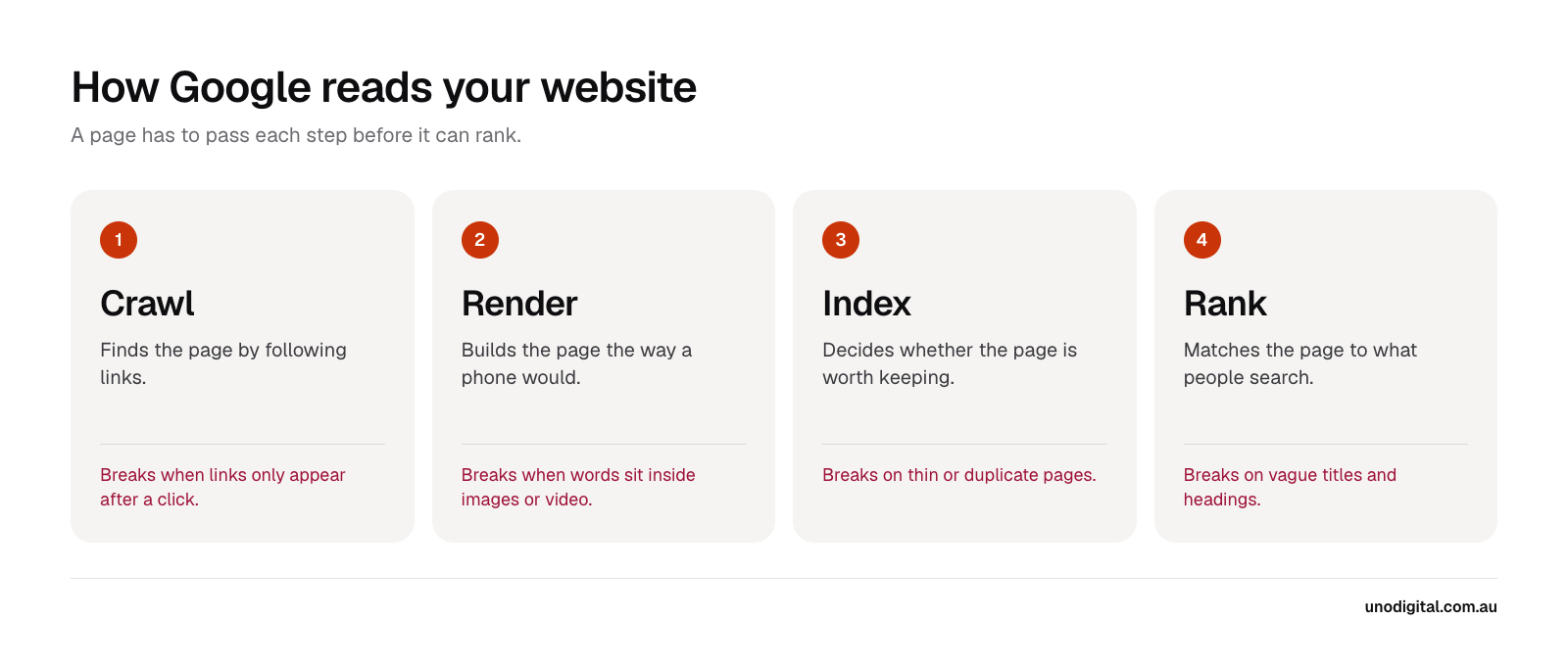
On the two sites in this guide, the biggest problems sat in the first three steps. You can check those yourself in about ten minutes, with two free tools.
Check a page in Google Search Console
Search Console is Google's own report on your site. If your practice doesn't have access, ask whoever built the site to add you as an owner.
- Paste the page's address into the search bar at the top and press Enter.
- Look for URL is on Google. If it says the URL is not on Google, the reason sits underneath.
- Click Test live URL, then View tested page.
- The HTML tab shows the code Google received. The Screenshot tab shows the page as Google's smartphone crawler rendered it.
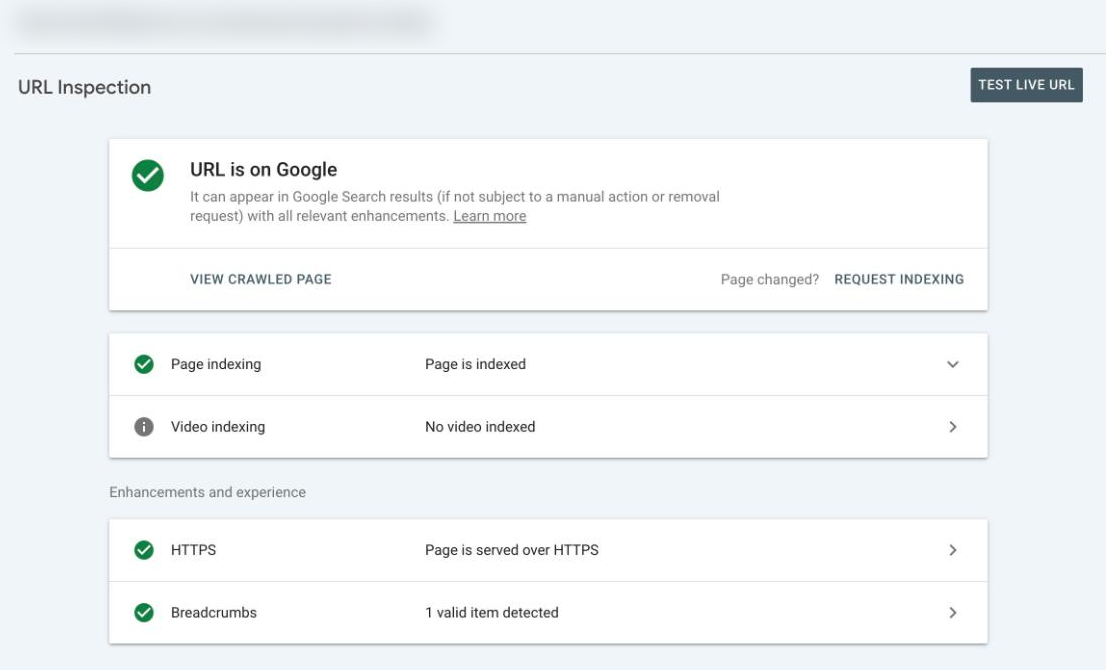
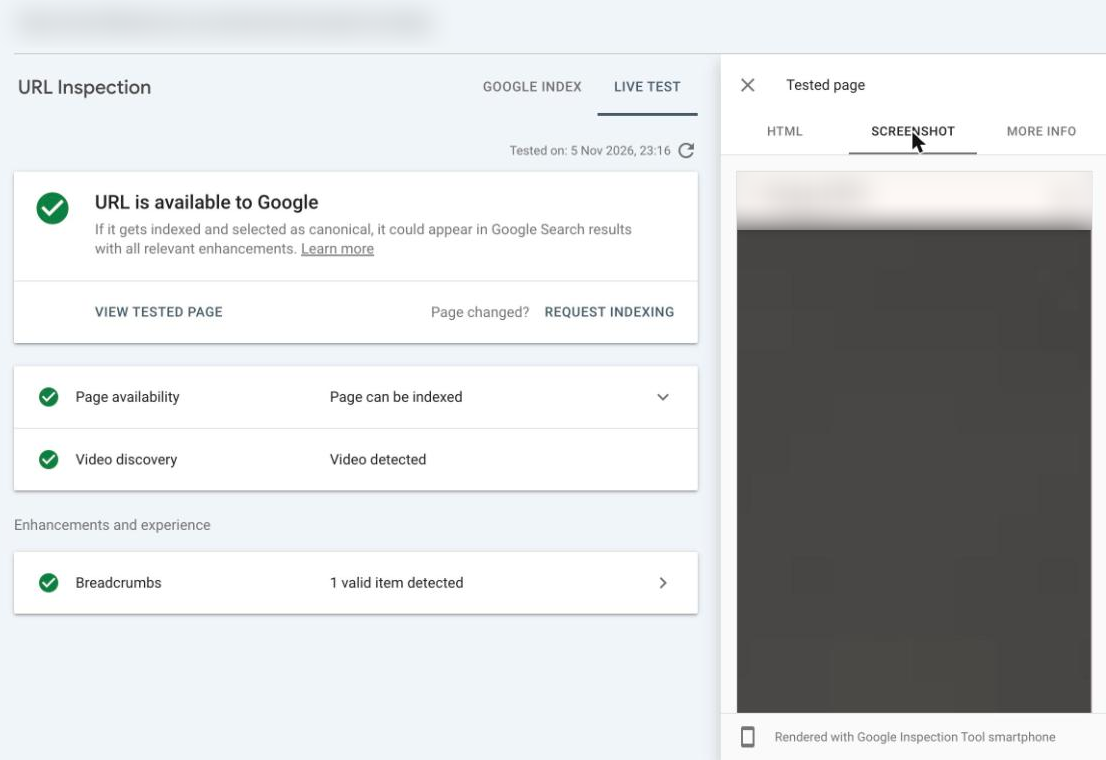
Use the HTML tab to check that your headings, treatment descriptions and links are in the code. Press Ctrl+F (or Cmd+F) inside the panel and search for a sentence from the page. If you can't find it, Google can't either.
Load your site as Googlebot in Chrome
You can also see your site the way Google's crawler sees it, from any page, in Chrome:
- Right-click the page and choose Inspect to open DevTools.
- Click the three-dot menu at the top right of DevTools, then More tools → Network conditions. The panel opens along the bottom of DevTools.
- Under User agent, untick Use browser default and choose Googlebot Smartphone.
- Press Cmd+Shift+P (Ctrl+Shift+P on Windows), type "Disable JavaScript" and press Enter.
- Reload the page.
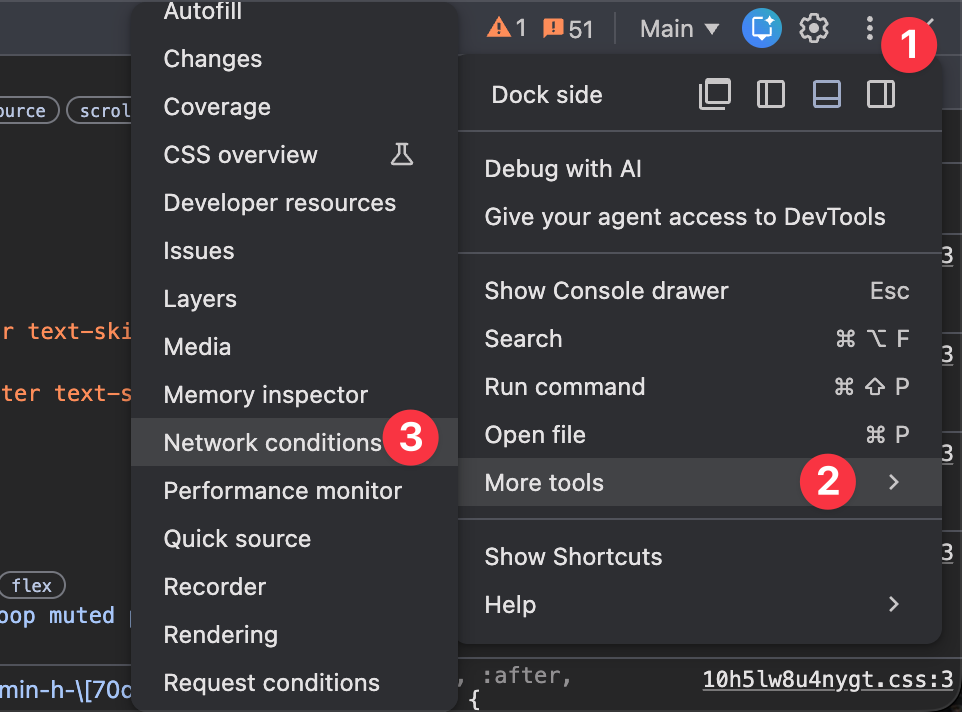
The page that's left is Google's first-pass view. We ran this on the Capalaba clinic page of the old Denture Pros site.
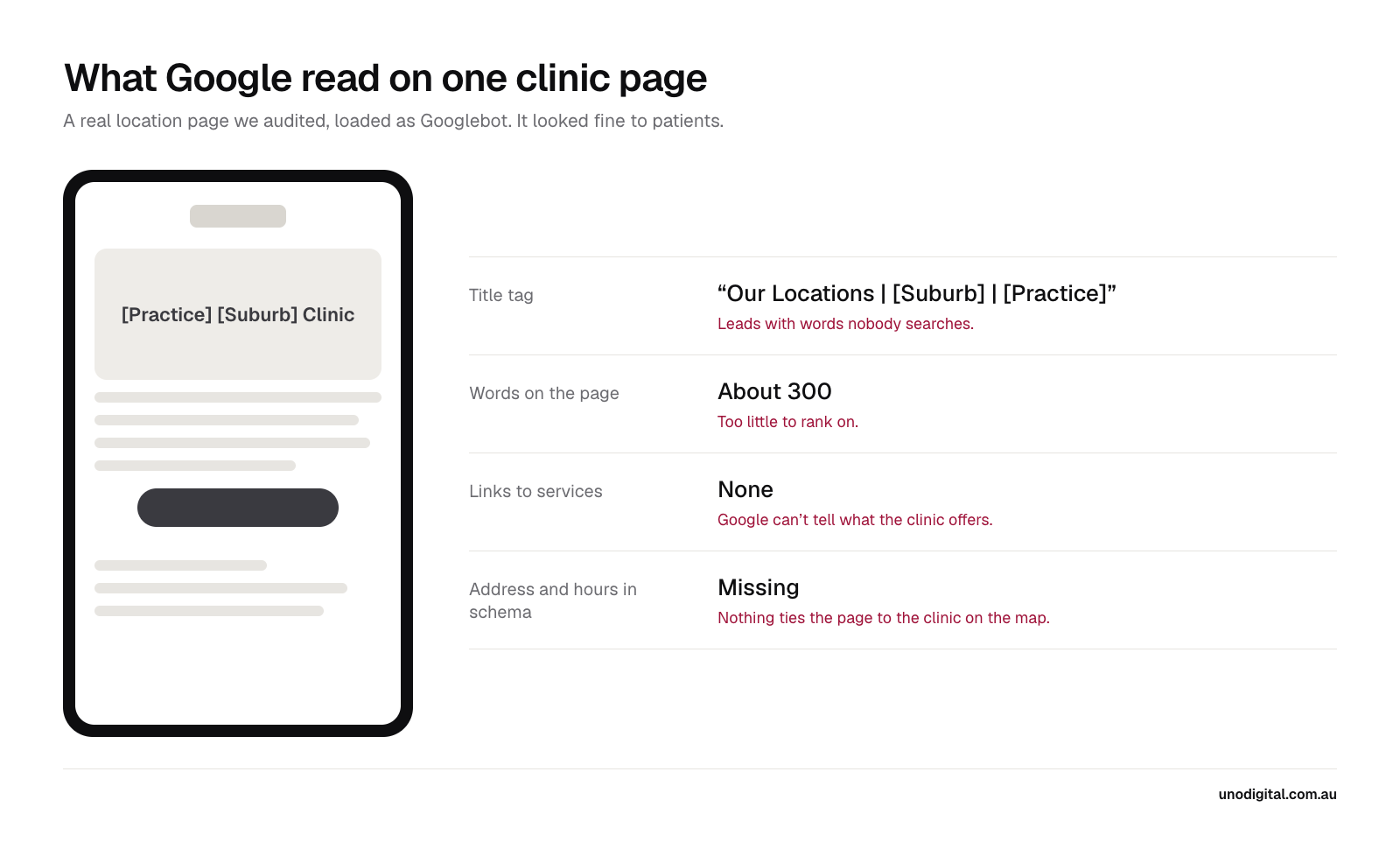
The page looks fine to a patient. To Google, it's 300 words with a title that leads with "Our Locations", no links to the services it mentions, and no address, phone number or opening hours in its structured data. In September it ranked #16 for "denture clinic capalaba", below the clinic's own Instagram profile.
All of them were build problems, and are fixable without writing a new word of content.
Site structure: group pages the way patients search
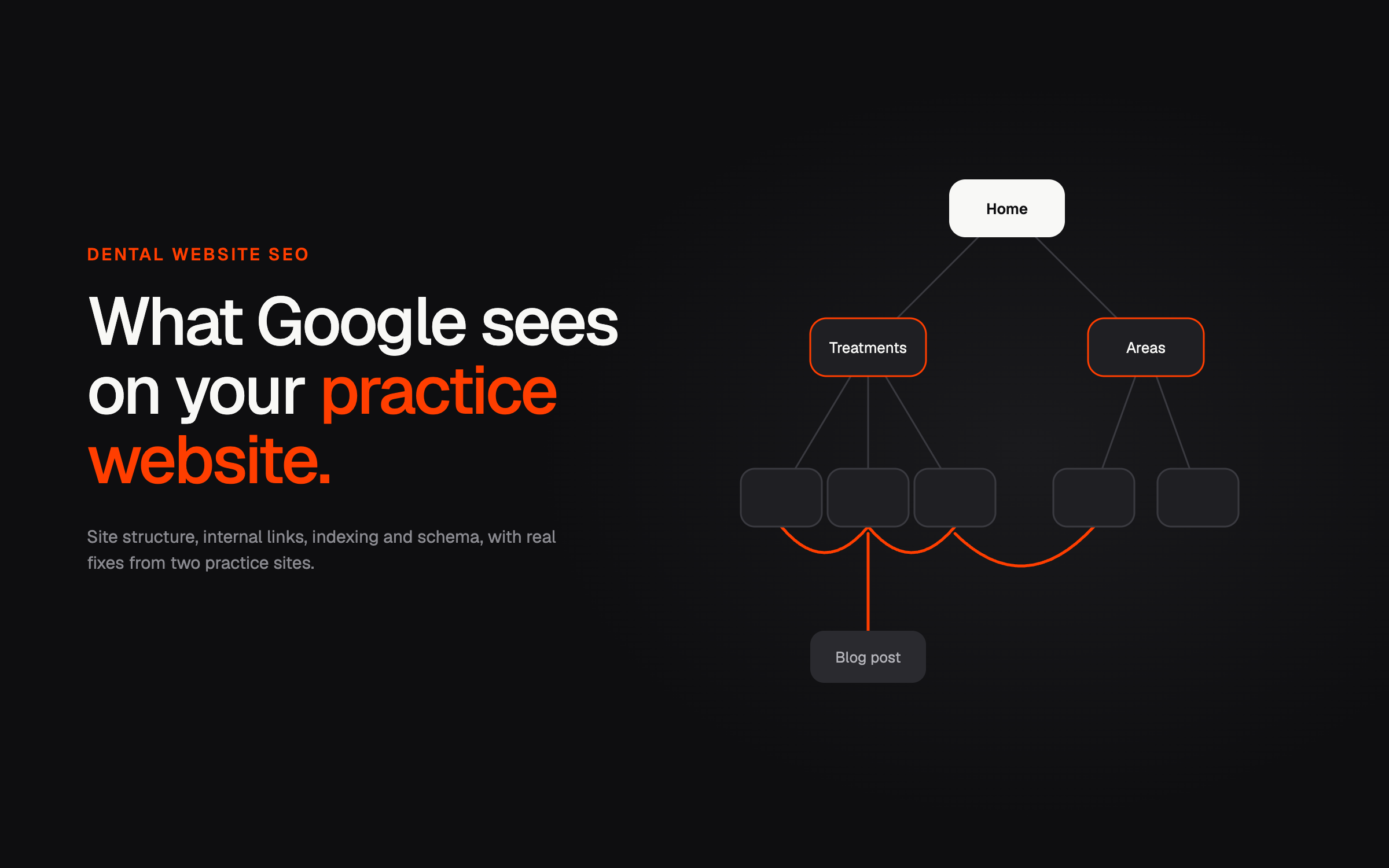
Patients search for a treatment, a problem or a location: "dental implants", "chipped tooth", "dentist New Farm". Your site structure should mirror that, with a page for each and a hub page that groups them.
The old Denture Pros site put all 13 pages at the top level. Clinics, services, the payment page and the terms and conditions all sat side by side, with nothing to tell Google which was which. The rebuilt site groups them.
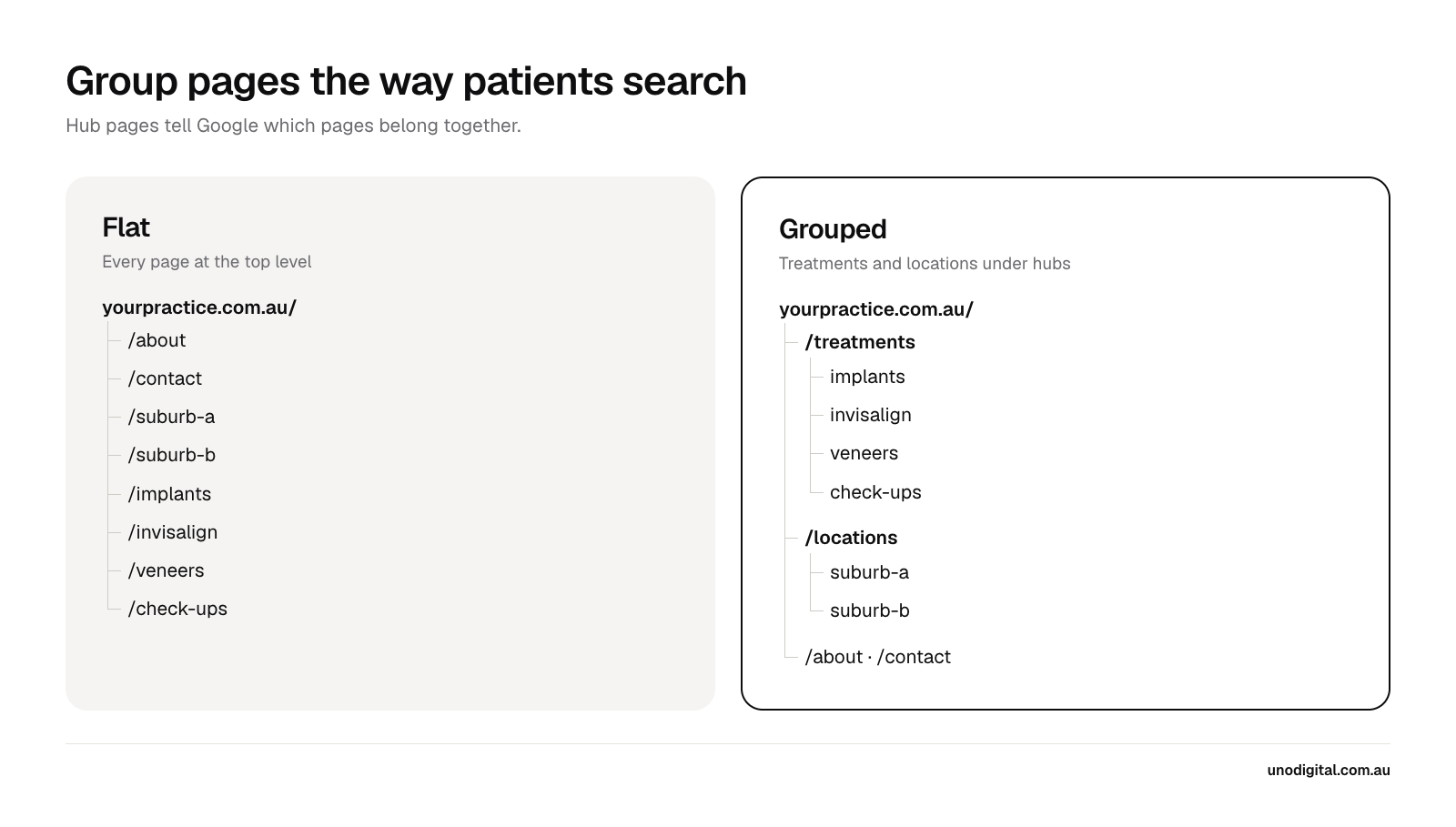
A few rules we follow on every practice site:
- One page per treatment you want patients for. If implants and veneers share a "cosmetic dentistry" page, neither has a strong page of its own to rank.
- A hub page for each group. A treatments page that links to every treatment, and a locations or areas page that links to every clinic or suburb page. The hub tells Google the pages belong together. From a hub page, you will naturally link to all related treatments. This internal linking is more important than the url structure.
- Short, readable URLs.
/services/full-denturesbeats/services-5or/page-id-482. Teneriffe Dental's old site buried treatments under messy, nested URLs. The rebuild moved every treatment to/treatments/[name]/. - Suburb pages only where you have something to say. For Teneriffe Dental's suburb pages, we used
/areas-we-serve/as the hub rather than/dentist-brisbane/, because a "dentist Brisbane" page would compete with the home page for the same search. Templated pages for twenty suburbs you don't serve read as doorway pages which go against Google's guidelines - Redirect every old URL when you move it. Each old Denture Pros URL has a permanent redirect to its new address, so links and bookmarks still land on the right page.
The Denture Pros move cost nothing in rankings, because the old site ranked for almost nothing beyond the brand name. On a site with rankings to protect, map every old URL to its new one before launch, and check Search Console for 404 errors in the weeks after.
Internal links: show Google which pages matter
Google follows links to find pages and uses them to judge which pages matter most. Your menu gives every page a route in. The links inside your page copy tell Google how pages relate to each other. From all the sites I've audited, internal linking is one of the most overlooked tactics in SEO.
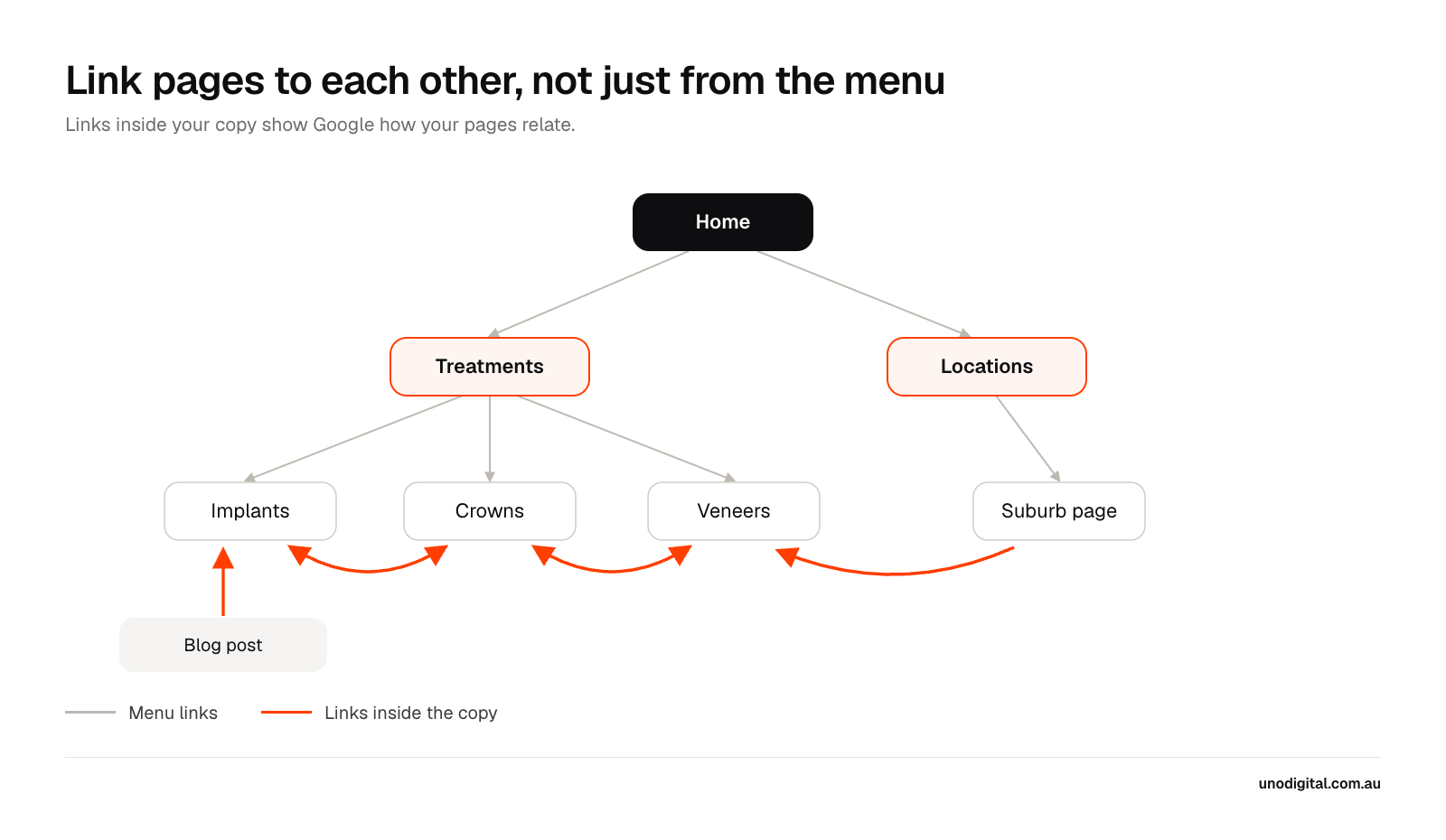
On the old Denture Pros site, every page carried the same 13 or so internal links, all from the menu and footer. No page linked to another from its copy. The Capalaba page had a "Comprehensive Services" section that didn't link to a single service.
Add these:
- Links between related treatments. Your implants page should link to crowns and bridges. Your Invisalign page should link to veneers. On Denture Pros we added a "Related services" list under every service page.
- Breadcrumbs. A line like Home › Treatments › Dental implants at the top of each page links it back to its hub.
- Blog posts that link to the treatment they're about. A post on implant costs should link to the implants page, with link text like "dental implants at our practice". Avoid "click here".
- Suburb and clinic pages that link to your main treatments. Each new Denture Pros clinic page lists the services offered there, with a link to each.
Indexing: make sure the right pages are in Google
Open Indexing › Pages in Search Console. It lists every page Google knows about, and why it left some out. Check the reasons against what you'd expect.
The problems we see most on practice sites:
- Leftover template pages. One competing denture clinic's site still has two contact pages (
/contact-3and/contact-4) and a webinar registration page, left over from its website template. The clinic doesn't run webinars. - A sitemap pointing at the wrong address. When we audited the old Denture Pros site in September, its sitemap listed all 13 pages on the previous developer's staging address instead of the live domain.
- A "noindex" tag left on after launch. Developers add it to keep a site out of Google while it's being built. If it stays on, the whole site stays out.
- Thin and near-duplicate pages. Two location pages with the same copy and a different suburb name, or tag and category pages that list one blog post each.
If a page you care about shows as "Crawled, currently not indexed", Google found it and decided it wasn't worth keeping. It tends to mean the page is thin or too close to another one. Improve the page, then use Request indexing in URL Inspection.
Titles and headings: say what the page is
The title tag is the blue link in Google's results, and the first thing a searcher reads. The H1 is the main heading on the page. Both should say what the page is about, in the words patients use.
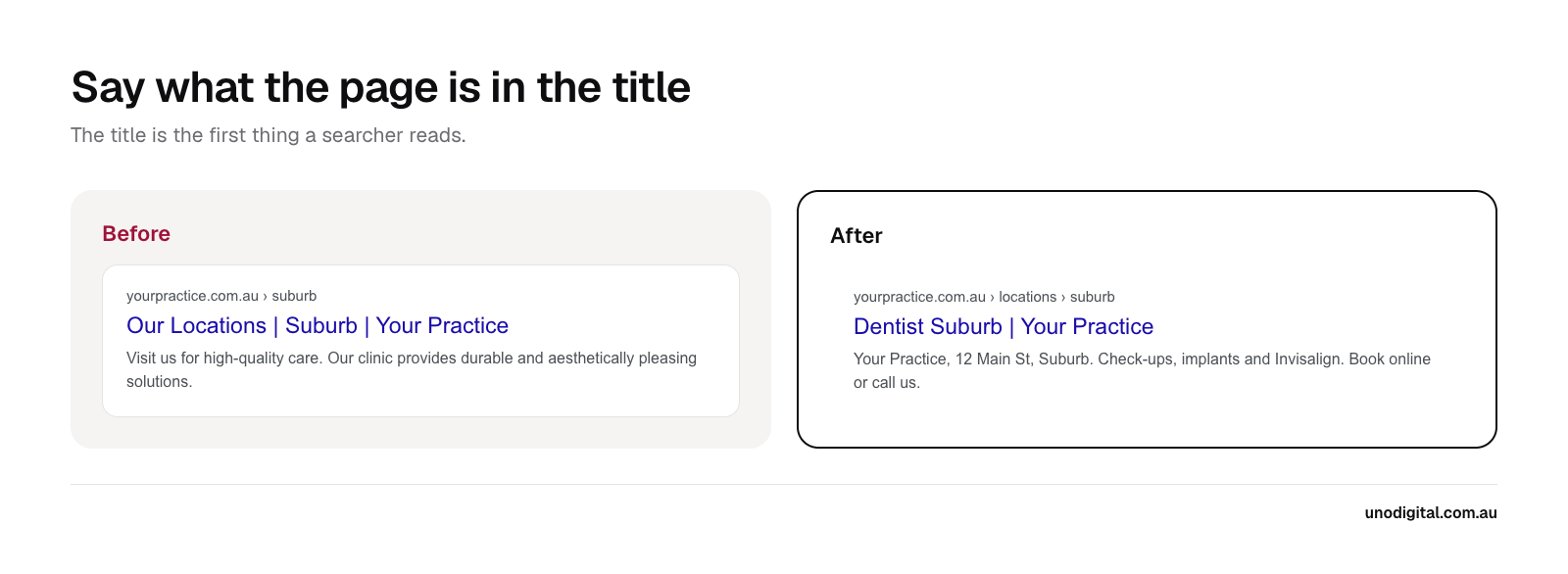
The old Capalaba title led with "Our Locations", and only the brand name hinted at what the clinic does. The new one leads with the search patients make, "denture clinic" plus the suburb, and the description gives the address, the services and the phone number. Fetched as Googlebot, the old Denture Pros home page also had two H1s with the same text. One H1 per page is the safe default.
For each page:
- Title: the treatment or service first, then the suburb if it's a location page, then the practice name. Keep it under about 60 characters so Google doesn't cut it off.
- H1: one per page, close to the title, written for people.
- Meta description: what the page covers and the next step, such as booking or calling.
Structured data: tell Google the facts
Structured data (often called schema) is code that states facts about your practice in a form machines can read: your name, each clinic's address, phone number, opening hours and services. Google uses it to connect your website to your Business Profile, social media profiles and to your clinic locations on the map.
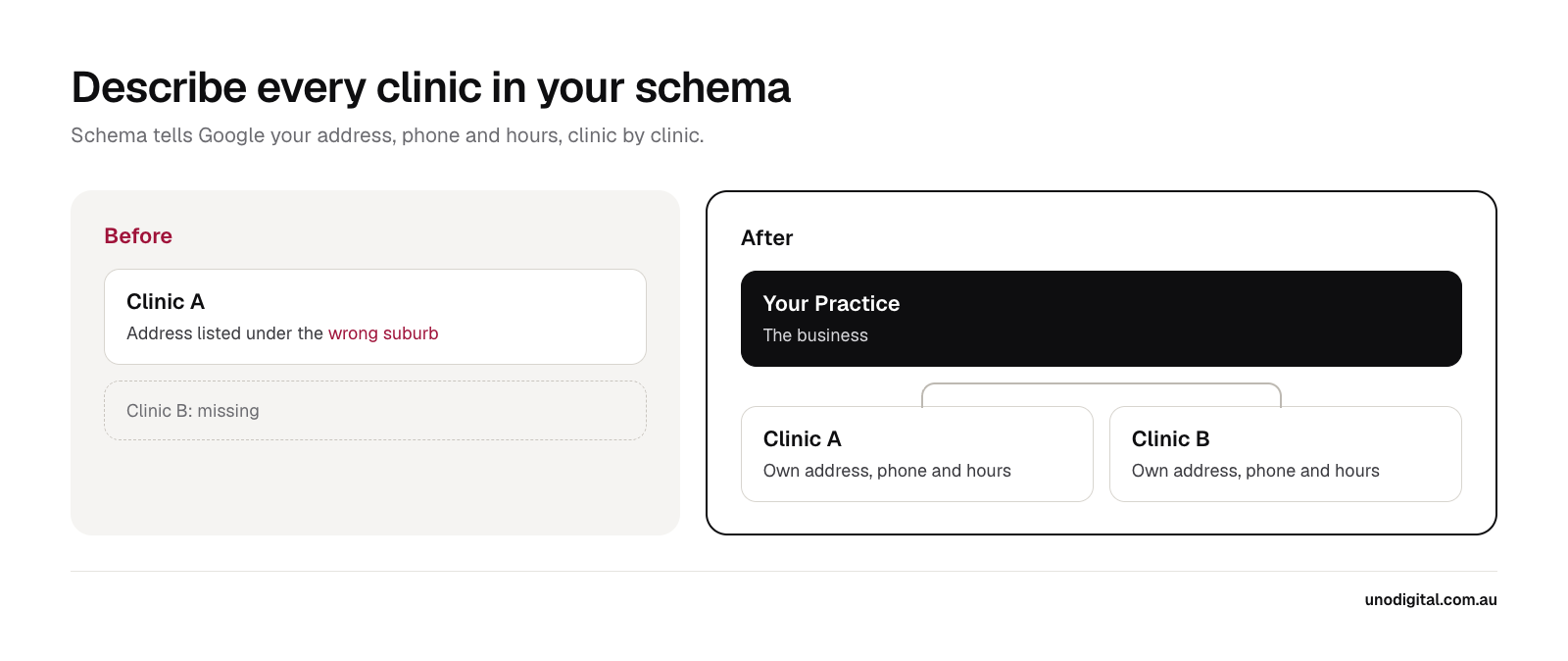
The old Denture Pros site described one business, at the Redland Bay address, in the suburb "Brisbane". The Capalaba clinic, the one with most of the Google reviews, didn't appear in the markup at all. The new site describes the business once and then each clinic on its own, with its own address, phone, map pin and hours.
Three things to get right:
- One entry per clinic. A practice with two locations needs two, each matching its Google Business Profile.
- The right type.
Dentistis a schema type, and it suits a practice run by dentists. Denture Pros usesMedicalBusinessinstead, because the practitioner is a dental prosthetist and "dentist" is a protected title under the National Law. The same care applies toPhysicianor specialist types. - No review stars on your own site. Google ignores review markup that a business adds about itself, so marking up testimonials won't put stars in your results. For dental practices, AHPRA's rules on testimonials make it a bad idea anyway.
To check your structured data, paste a page into Google's Rich Results Test or the Schema Markup Validator.
Content on each page, written to AHPRA's rules
Once Google can find and read your pages, what they say decides how well they rank and whether visitors book. A good treatment page answers what a patient asks before they book: what the treatment is, who it suits, what happens at each visit, what it costs and how to book.
Dental websites carry an extra constraint. AHPRA's advertising rules apply to every page, so no "best dentist in Brisbane", no "pain-free" promises and no testimonials about clinical results. Our AHPRA advertising guide covers what you can and can't write.
Google also holds health pages to a higher standard than most, because bad advice can hurt someone. It calls these "Your Money or Your Life" topics. Make it easy to see who stands behind each page: give every practitioner a page with their qualifications and AHPRA registration, and link to it from the treatments they provide.
Track whether it's working
Rankings are a guide. The number that matters is new patients from search.
- Search Console › Performance: filter out your practice name to see searches from people who didn't already know you. Teneriffe Dental's non-branded clicks went from 14 to 103 between August–October 2025 and August–October 2026, and the number of non-branded searches it ranked on page one for went from 46 to 420.
- Call and form tracking: tie each enquiry to the channel it came from. Without it you can't tell whether SEO or ads produced a patient.
- Search Console › Pages: check each month that Google has indexed the pages you care about.
More on those results in the Teneriffe Dental case study.
Common questions
How long does dental website SEO take to work?
Technical fixes, like a corrected sitemap or a removed noindex tag, can show up within weeks of Google recrawling the site. Rankings for treatment and suburb searches tend to take three to six months to move. Broad terms like "dentist Brisbane" take longest.
Does page speed matter for dental SEO?
It matters, but less than most audits suggest. A slow site frustrates patients on phones, so fix it if your pages take more than a few seconds to load. Structure, indexing and clear page content move rankings far more on most practice sites.
Do I need a new website to fix my dental SEO?
Not always. Many sites need better structure, links, titles and schema, and nothing more. Rebuild when the platform stops you fixing those things, or when the site is costing you enquiries, as Teneriffe Dental's old site was.
Can our web developer do this?
Some can. Ask them to show you the Search Console Pages report, a crawl of the site and the structured data on your location pages. If they can't, that tells you where to start.
Should every suburb we serve get its own page?
No. Build suburb pages where you have patients and something specific to say, such as directions, parking or the treatments people there ask for. A few strong pages beat twenty templated ones.
Where to start with dental website SEO
Run one of your main treatment pages through URL Inspection, then load it as Googlebot in Chrome. Check that the words, headings and links you care about are in the HTML. Then open the Pages report and look for anything missing. Those three checks find most of the problems in this guide.
Good dental website SEO starts with a site Google can find, read and trust. If you'd like us to run these checks on your site, see how our dental SEO works, or book a call below.

Daniel Edwards
Co-founder
Daniel co-founded Uno Digital and runs SEO, Google Ads and CRM work for Australian businesses. He builds the tracking that ties marketing to enquiries and booked work.
- Google Ads
- Technical SEO
- Local SEO
- Zoho CRM